Generating PDFs through Excel Uploads
The system offers a straightforward way for users to generate personalized PDFs by uploading customer data via Excel sheets. This feature is particularly beneficial for small businesses that lack access to third-party API systems. It streamlines the process, enabling users to generate PDFs at scale, thereby saving both time and effort.
Follow these steps:
1. Navigate to the menu option located on the left side of the home screen.
2. Choose Transactions and select Generate PDF.
3. Please be aware that only templates that have been published are accessible in this section. Choose a template of your preference. You can also utilize the search option located on the right side of the screen to easily find your desired template.
4. Upon selecting the template, a window will appear displaying the details of the selected template and the available variables within the chosen template. Navigate to the upper right corner of the page, and click on the "Sample Format" option to download the Excel sheet for entering data corresponding to the variables embedded in the template.
5. In the "Sample Format" Excel sheet, fill in the data according to the number of Printable PDFs you wish to create. Input the required information in the rows and columns, corresponding to the number of variables present in your chosen template.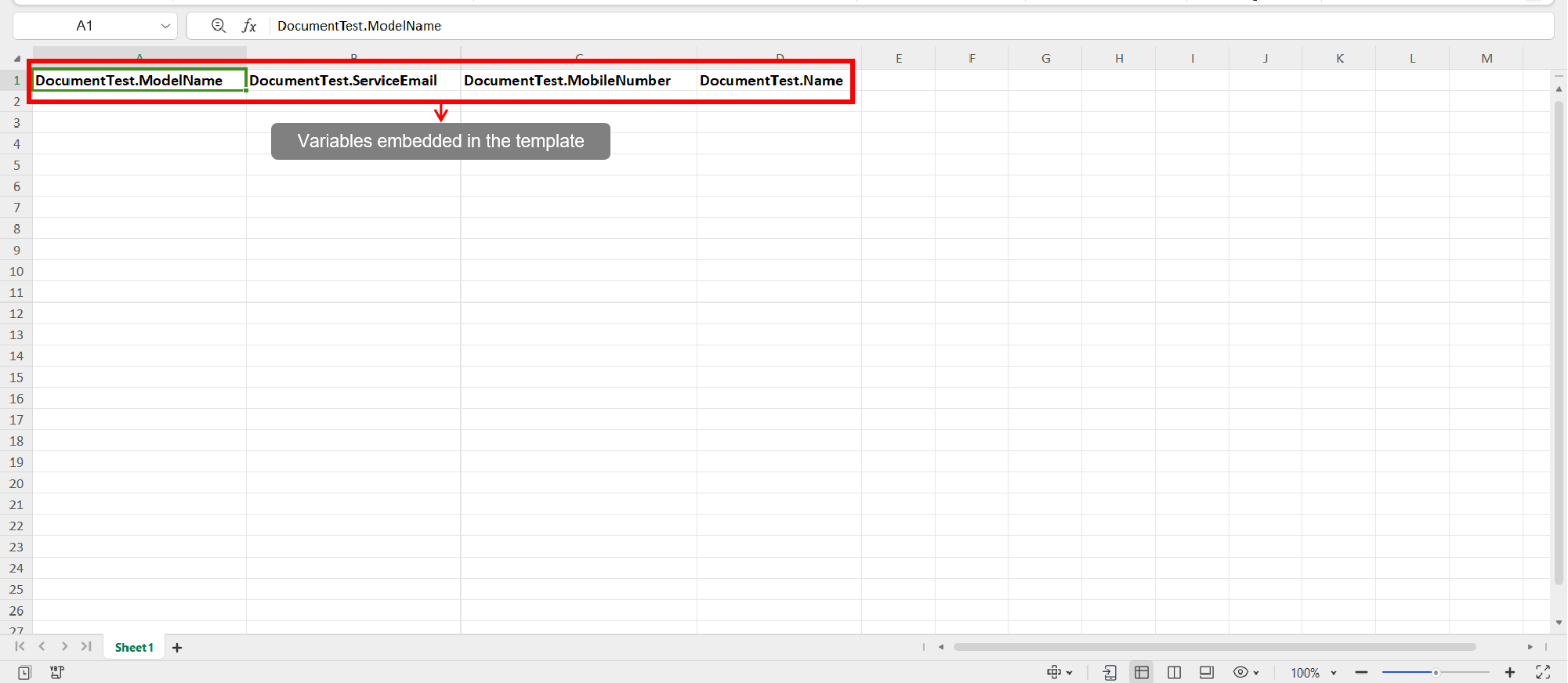
6. Now come back and simply drag and drop the Excel sheet in the below area.
7. The system will automatically generate the PDFs, and the resulting files will be downloaded as a consolidated Zip file.

Info: Only published templates are visible in the selection area. Therefore, please ensure that your document is published before making a selection.
VIDEO DEMO:
Related Articles
Triggering Emails Through Excel Uploads
The system offers a straightforward way for users to trigger personalized Emails by uploading customer data via Excel sheets. This feature is particularly beneficial for small businesses that lack access to third-party API systems. It streamlines the ...Auto Generating Content in a Document
In PerfectDoc Studio, you can quickly produce content by specifying the topic title of interest. The system is equipped to efficiently generate content across a broad spectrum of topics almost instantaneously. To make use of this functionality, ...What is Business Logic?
Business Logic refers to the set of rules and conditions that determine how information is displayed, structured, or processed within a document. Instead of generating static, one-size-fits-all communications, business logic allows documents to adapt ...What is Channel Mapping?
If a user needs to share common information with a specific group of people via printed PDFs, emails, and short messages, there’s no need to create separate templates for each module. Instead, they can create a single document template and link email ...Adding an Image to the Document
To insert or upload an image into your document's design, please follow the instructions below: 1. From the menu on the left, select the "Let’s Design" option. 2. Within this section, find and select the "Creative Block" feature, then drag it into ...